/zpack geyser and CustomiZer builds a complete Bedrock resource pack for your server, so Bedrock (phone/console) players see your custom content almost exactly like Java players. A few things can be fine-tuned with simple /zpack bedrock commands.
Contents
1. How it works (the big picture)
Bedrock can't read Java resource packs. Geyser is the proxy that lets Bedrock players join your Java server; it needs a special Bedrock resource pack plus a "mappings" file that tells it which Java custom item = which Bedrock item.
CustomiZer's converter reads your packs (the same ones in plugins/CustomiZer/packs/) and generates all of that for you: the Bedrock pack (.mcpack), the geometry, textures, icons, animations and the Geyser mappings — written to plugins/CustomiZer/import_export/geyser_output/.
/zpack geyser, done.2. Quick start
- 1 Make sure Geyser (and usually Floodgate) are installed on your server/proxy.
- 2 Run
/zpack geyserin-game (needs permissioncxp.admin). - 3 Grab the generated files from
plugins/CustomiZer/import_export/geyser_output/. The easiest approach: extractall_mcpacks.zip→ drop its contents intoGeyser-Spigot/packs/, and extractall_mappings.zip→ drop its contents intoGeyser-Spigot/custom-mappings/. Then run/geyser reload. - 4 Join on Bedrock and check your content.
- 5 If something is slightly off (a GUI shifted, furniture too small), use the
/zpack bedrock …commands below, then run/zpack geyseragain.
/zpack bedrock … tweak you must re-run /zpack geyser to rebuild the pack. You do not need /zpack reload in between — the export reads your tweaks automatically.3. What works automatically
These need no commands — the converter handles them for every pack:
| Feature | Notes |
|---|---|
| 2D items Flat items | Custom textures shown as inventory icons. |
| Blocks | Custom blocks (incl. note-block based) mapped for Bedrock. |
| 3D items Tools, weapons, cosmetics | Full 3D geometry held in hand & in world, with correct UV rotation and two-sided faces. |
| Inventory icons | For 3D items the converter renders a proper 2D icon from the model (no more garbled texture sheet). |
| Armor & hats | Helmets/hats render in the head slot using the model's display.head. |
| Food & crops | Seeds, produce, food (bean, asparagus, …) show their real textures instead of falling back to a plain apple. |
| Attack swing | Left-click / mining swing works (the converter leaves Bedrock's vanilla arm swing intact). |
| GUIs | Custom menus rendered via font glyphs, including chest/furnace-style backgrounds. |
| Furniture | Placed furniture renders in 3D on Bedrock (see section 9). |
| Animated textures | Flipbook textures (e.g. spinning windmill blades) animate on Bedrock (see section 8). |
| Auto sizing Textures & bounds | Real texture resolutions (16/32/64/128/512…) are used, and large models get auto visible-bounds so they aren't culled off-screen. |
Some things — extreme cosmetics (wings on the back), GUI position, furniture size — sometimes need a one-time nudge. That's what the commands below are for.
4. /zpack geyser — build the Bedrock pack
This is the command that does the conversion. Run it whenever you add/change packs or after any /zpack bedrock … tweak.
/zpack geyserWhen you run the command, each pack is processed individually and the totals are shown in chat. Here's what the output looks like on a real server:
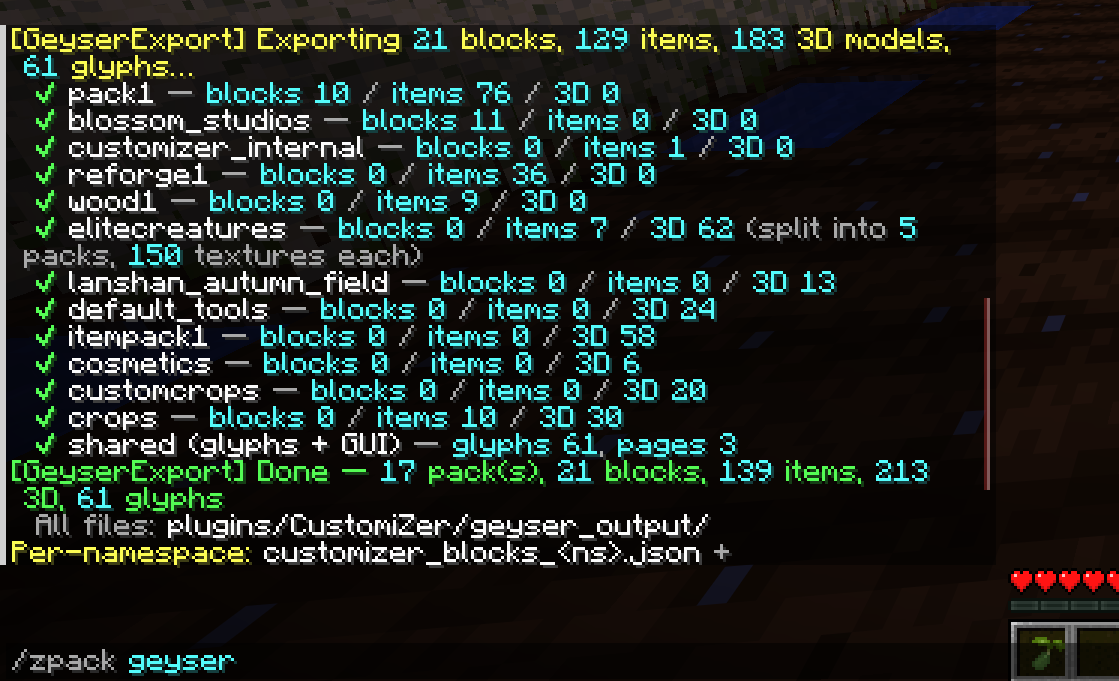
The in-game export log — each namespace shows how many blocks / items / 3D models were converted. Packs with many textures (like elitecreatures) are automatically split into sub-packs of 150 textures each to stay within Bedrock's file-size limits. The summary line at the bottom gives the total count across all packs.
Output goes to plugins/CustomiZer/import_export/geyser_output/. Files are generated per namespace so large servers can selectively load packs:
| File | Where to put it |
|---|---|
customizer_bedrock_<ns>.mcpack | Geyser-Spigot/packs/ |
customizer_bedrock_shared.mcpack — shared textures/fonts | |
customizer_blocks_<ns>.json | Geyser-Spigot/custom-mappings/ |
customizer_items_<ns>.json | |
all_mcpacks.zip — every .mcpack bundled | Extract → Geyser-Spigot/packs/ |
all_mappings.zip — every mapping JSON bundled | Extract → Geyser-Spigot/custom-mappings/ |
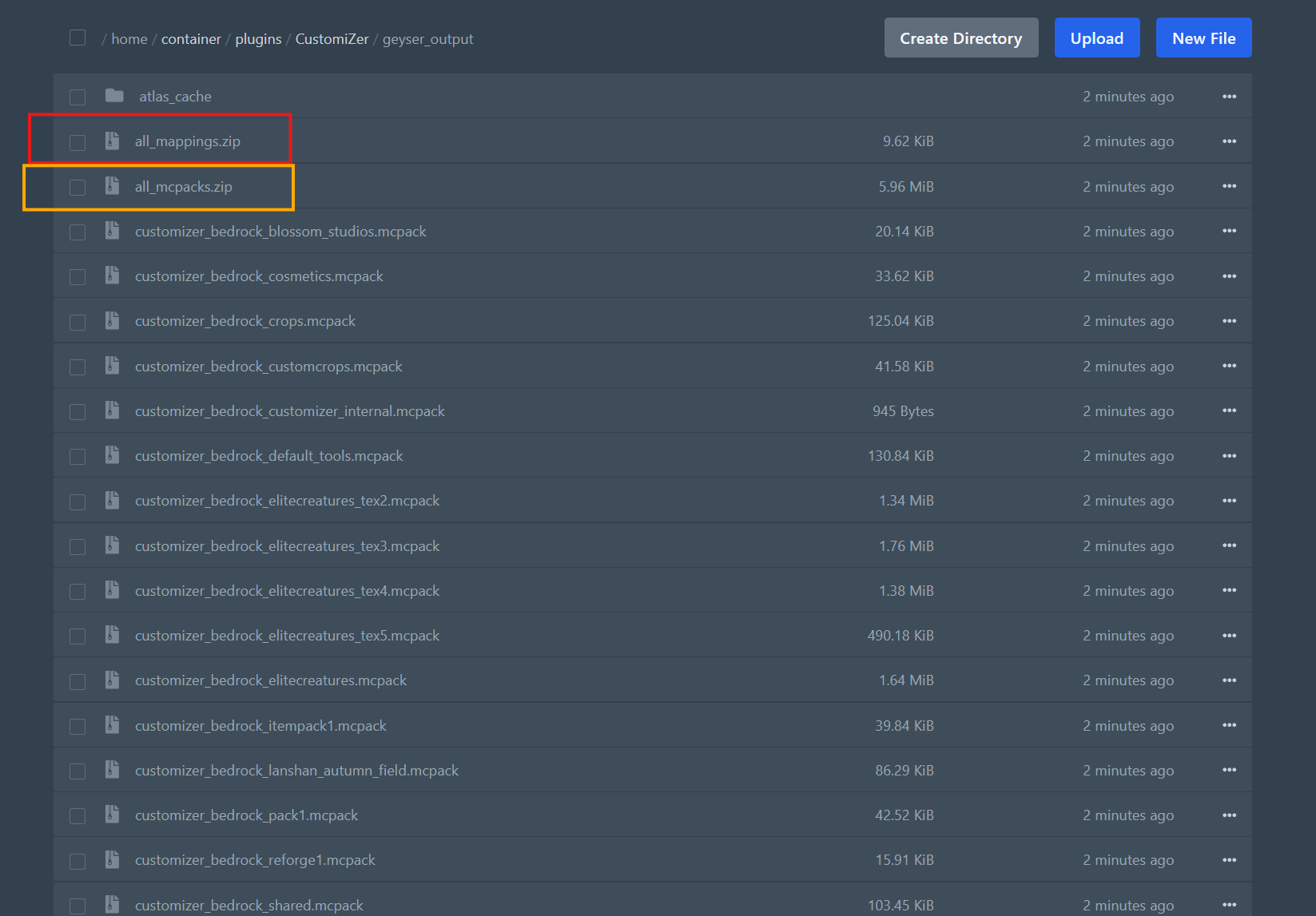
The import_export/geyser_output/ folder after running /zpack geyser. all_mcpacks.zip (yellow border) bundles every .mcpack file — extract it into Geyser-Spigot/packs/. all_mappings.zip (red border) bundles every Geyser mapping JSON — extract it into Geyser-Spigot/custom-mappings/. The individual per-namespace files are there if you need to load specific packs only.
The simplest workflow: use the two .zip bundles — extract each to the right Geyser folder, then run /geyser reload. The per-namespace files let you load only specific packs if needed.
5. /zpack bedrock gui — move a GUI
Bedrock ignores the Java font "ascent", so custom menus can appear shifted (e.g. lifted up). This command nudges a GUI back into place.
| Command | What it does |
|---|---|
/zpack bedrock gui <name> <up/down/left/right> <amount> | Move the GUI. Tab-complete lists your GUI names. |
/zpack bedrock gui <name> <amount> | Shortcut: positive = down, negative = up. |
/zpack bedrock gui <name> | Show the current offset for that GUI. |
/zpack bedrock gui <name> reset | Clear the offset (back to default). |
/zpack bedrock gui list | List every GUI you've adjusted. |
Example — the main menu sits too high on Bedrock:
/zpack bedrock gui customizer_main down 20
/zpack geyserdown 6 then down 1 = down 7 (not reset). Big menus (chests) usually need values like 10–40. Find the name with Tab or /zpack fonts.6. /zpack bedrock item — fine-tune a 3D item
For 3D items whose position/size/rotation needs adjusting per hand slot (e.g. wings on the back, a tool held slightly off). Tab-complete lists your 3D item names.
| Command | What it does |
|---|---|
/zpack bedrock item <name> <slot> move <x/y/z> <amount> | Nudge position along an axis. |
/zpack bedrock item <name> <slot> scale <factor> | Resize (e.g. 1.5 = 50% bigger). |
/zpack bedrock item <name> <slot> rotate <x/y/z> <degrees> | Rotate around an axis. |
/zpack bedrock item <name> <slot> reset | Clear that slot's tweaks. |
/zpack bedrock item <name> resetall | Clear all tweaks for the item. |
/zpack bedrock item <name> | Show current tweaks. |
Slots: hand (main hand), offhand (off hand), head (worn/hat).
Example — push wings onto the back & make them bigger:
/zpack bedrock item valentines_animated_weapon_and_tool_set_v1_wing offhand move z 8
/zpack bedrock item valentines_animated_weapon_and_tool_set_v1_wing offhand scale 1.5
/zpack geyser/zpack geyser, look, and adjust — it's quick to learn by trial.7. /zpack bedrock furniturescale — size furniture
Placed furniture can come out a bit small or large on Bedrock. This sizes it — globally or per piece. Tab-complete lists only your furniture.
| Command | What it does |
|---|---|
/zpack bedrock furniturescale <value> | All furniture at once (1.0 = default, 2 = twice as big). |
/zpack bedrock furniturescale <name> <value> | One specific furniture. |
/zpack bedrock furniturescale | Show the current global value + usage. |
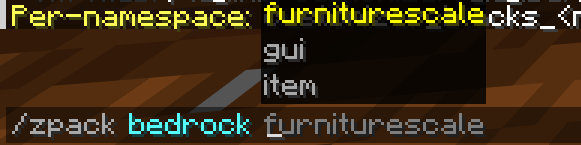
Tab-complete after /zpack bedrock — the three tuning subcommands (furniturescale, gui, item) are all suggested. This is the full set of per-pack Bedrock adjustment commands; each one is described in its own section above.
Examples:
# Make every furniture 50% bigger
/zpack bedrock furniturescale 1.5
/zpack geyser

# Make just the windmill twice as big
/zpack bedrock furniturescale field_windmill 2
/zpack geyser1.5 × windmill 2 = windmill at 3×. You can also use the full item … head scale / move form for position tweaks.8. Animated textures supported
If a texture is an animated flipbook on Java (a tall strip with a .png.mcmeta, e.g. spinning windmill blades or a glowing rune), the converter recreates that motion on Bedrock:
- It bakes one texture frame per animation frame, and
- generates a render controller that cycles them over time, using the same
frametimeas the Java.mcmeta.
Result: the animation plays on Bedrock just like Java — no setup needed. A non-animated variant of the same model (no .mcmeta) stays static, as expected.
9. How furniture renders on Bedrock
On Java, furniture uses an item frame (which shows the full 3D model). Bedrock item frames only show a flat icon — so the converter additionally spawns an invisible armor stand with the model on its head, and shows:
- Java players → the item frame (unchanged), and
- Bedrock players → the armor-stand model (real 3D),
…for the same placed furniture, based on who is looking. Neither side sees a duplicate. Detection uses Floodgate (Bedrock player UUIDs). This is all automatic; you only ever touch size via furniturescale.
10. Limits & gotchas
LEATHER_HELMET) and a chest/back piece on LEATHER_CHESTPLATE. Items based on LEATHER_HORSE_ARMOR can't be worn on Bedrock — Java renders any item in an armor slot, Bedrock doesn't. If a cosmetic won't equip on Bedrock, change its base material in the pack config.
- This is a CustomiZer converter, not a "drop any Java resource pack" tool — content must be registered the normal CustomiZer way.
- Server configs don't auto-update: if you edit a pack config that already exists on the server, edit it there (or delete it to regenerate) — updating the jar alone won't overwrite an existing config.
- Floodgate: Bedrock-player detection (for furniture) assumes standard Floodgate UUIDs.
11. Troubleshooting
| Symptom | Fix |
|---|---|
| A GUI is shifted up/down | /zpack bedrock gui <name> down <n> → /zpack geyser |
| Furniture too small / too big | /zpack bedrock furniturescale <value> (or per-piece) → /zpack geyser |
| Wings/cape in the wrong spot | /zpack bedrock item <name> offhand move z <n> → /zpack geyser |
| A hat/armor won't equip on Bedrock | Use a wearable base material (LEATHER_HELMET/LEATHER_CHESTPLATE) in the pack config. |
| A change didn't show up | Did you re-run /zpack geyser and re-import the pack on the Bedrock client? |
| A model didn't convert | Check the console log during /zpack geyser for a warning naming that item/model. |
12. Command cheat sheet
# Build / rebuild the Java resource pack, then the Bedrock pack
/zpack zip
/zpack geyser

# Get a clickable link to the hosted Java resource pack URL
/zpack link

# GUIs (menus)
/zpack bedrock gui <name> <up|down|left|right> <amount>
/zpack bedrock gui <name> <amount>          # + = down
/zpack bedrock gui <name>                    # show
/zpack bedrock gui <name> reset
/zpack bedrock gui list

# 3D items (per hand/head slot)
/zpack bedrock item <name> <hand|offhand|head> move   <x|y|z> <amount>
/zpack bedrock item <name> <hand|offhand|head> scale  <factor>
/zpack bedrock item <name> <hand|offhand|head> rotate <x|y|z> <degrees>
/zpack bedrock item <name> <hand|offhand|head> reset
/zpack bedrock item <name> resetall
/zpack bedrock item <name>                    # show

# Furniture size
/zpack bedrock furniturescale <value>          # all furniture
/zpack bedrock furniturescale <name> <value>   # one piece
/zpack bedrock furniturescale                  # show

# Always re-run after any tweak:
/zpack geyser/zpack bedrock … command → run /zpack geyser → re-import the pack on Bedrock → look → repeat until perfect. Everything is cumulative and saved, so you build up the perfect setup over time.